Printer Storage for a Small Home Office
A printer's closed case is only part of its footprint. Paper trays extend, lids lift and service panels open. Find a position where the actual machine can work and be maintained, rather than choosing a cabinet that hides it only while it is switched off.
Read the model's installation and operating guidance first. Different printers have different clearance, environmental and electrical requirements.
Measure operating space as well as the case
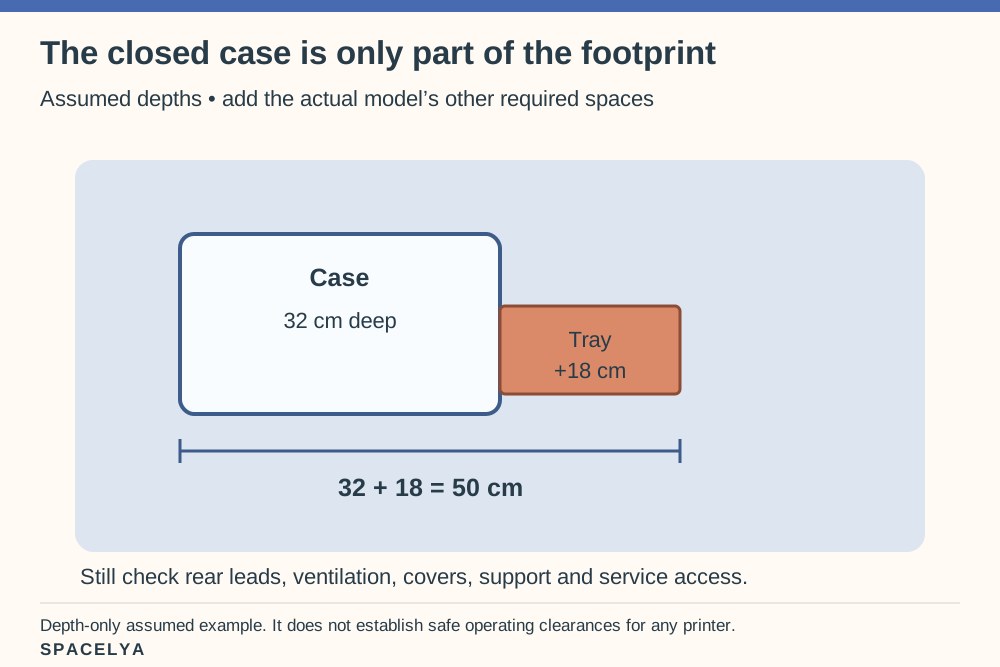
Open the trays and covers as the manual specifies, and measure the complete operating outline. Include paper feeding and the space for removing a printed page. A cupboard depth that suits the case may not suit the extended tray.
Use the manufacturer's drawings where available. Our small-apartment desk-location guide can help assess nearby positions if the main desktop cannot accommodate that working footprint.
For a depth-only example, assume a printer case is 32 cm deep and its front tray projects a further 18 cm. Those two parts occupy 50 cm: 32 + 18. That still excludes whatever rear cable space, ventilation and service access the actual model requires. A 35 cm shelf that holds the closed case has not passed an operating-space check. The diagram uses assumed dimensions, not measurements of a recommended printer.
Choose a shelf rated for the equipment
Check the printer's weight and the support's capacity, stability and installation requirements. Include supplies stored on the same shelf. Do not assume a decorative ledge or lightweight trolley is suitable for a substantial machine.
Keep the printer manageable to reach without an awkward high lift. A cobalt cabinet or persimmon file nearby can provide color while the equipment remains in its original form. The furniture should support the machine's operation, not merely frame it attractively.
Keep paper storage nearby and dry
Store paper according to its packaging and the printer guidance. Keep a modest working supply within comfortable reach and avoid a tall unstable pile beside the output tray. Different paper sizes may need separate identifiable positions.
Leave labels and compatibility information available where useful. A nearby drawer can suit paper if its conditions and dimensions are appropriate, but do not fill a required service gap with reams simply because the space looks unused.
Keep the working paper supply separate from space the machine needs to move or breathe. A few sheets at the ready are a different storage problem from several heavy unopened reams. Check a paper drawer with its largest usual package inside, then open the printer's tray and pick up a finished page. Neither job should require balancing paper on the machine or blocking a cover.
Leave vents unobstructed
Follow the printer's specified ventilation and placement clearances. A closed cabinet, fabric cover or decorative box may be unsuitable during use. Do not infer that an open back provides all the airflow the model requires.
If the proposed bay does not support the instructions, choose another position. Keep a distinction between permitted storage when not in use and an appropriate operating location. The machine's requirements determine that decision.
Look up the exact model rather than applying another printer's gap diagram. For example, Brother's official manuals service lets users find product-specific documentation. Keep the relevant guide with the model name when comparing furniture. An attractive cabinet photograph does not establish that the machine may run inside it, even with the door open.
Plan the cable route
Keep leads within their specified use and clear of pinching doors, moving chairs and walking routes. Leave necessary plugs accessible. Avoid pulling the printer forward in a way that strains or traps its connections.
Choose an appropriate electrical arrangement and obtain qualified advice where necessary. Our blank-wall decorating guide can help keep surrounding display pieces off the equipment area, rather than using a decorative panel to conceal access you still need.
Check the service-access position
Imagine replacing the consumable or clearing a jam exactly as the manual directs. Check whether covers open and whether you can see and reach the relevant parts comfortably. Include the movement required to remove the machine for servicing if needed.
Keep instructions available with the model information. A useful printer position makes those occasional tasks possible without dismantling a shelf of objects. Once that works, retain only the supplies the machine actually needs nearby.
Make a short access list from that manual: load paper, collect the output, replace the relevant consumable and use the specified jam-clearing access. Some jobs happen at the front, others above or behind the case. Check each required position before installing a shelf over the printer. If a service step needs the machine moved, follow the manufacturer's handling and power instructions rather than improvising that move while it is operating.
Can a printer operate inside a cupboard?
Only when the specific model's operating requirements are met by that arrangement. Check ventilation, clearances, support, environment and access rather than assuming opening the door is sufficient. Choose a different position when the instructions do not support the proposed bay.
About the illustrations
The reused AI-generated SPACELYA cover shows a working desktop as a space reference. The original printer graphic uses assumed dimensions to explain the operating-footprint check. Actual printer placement must follow the model's instructions; the illustration does not show a tested installation.
A beautiful small space is not about having more. It is about making what you have work better. — Spacelya